Easy Insight Logo
SOS Inventory Logo

SOS Inventory Reports and Dashboards

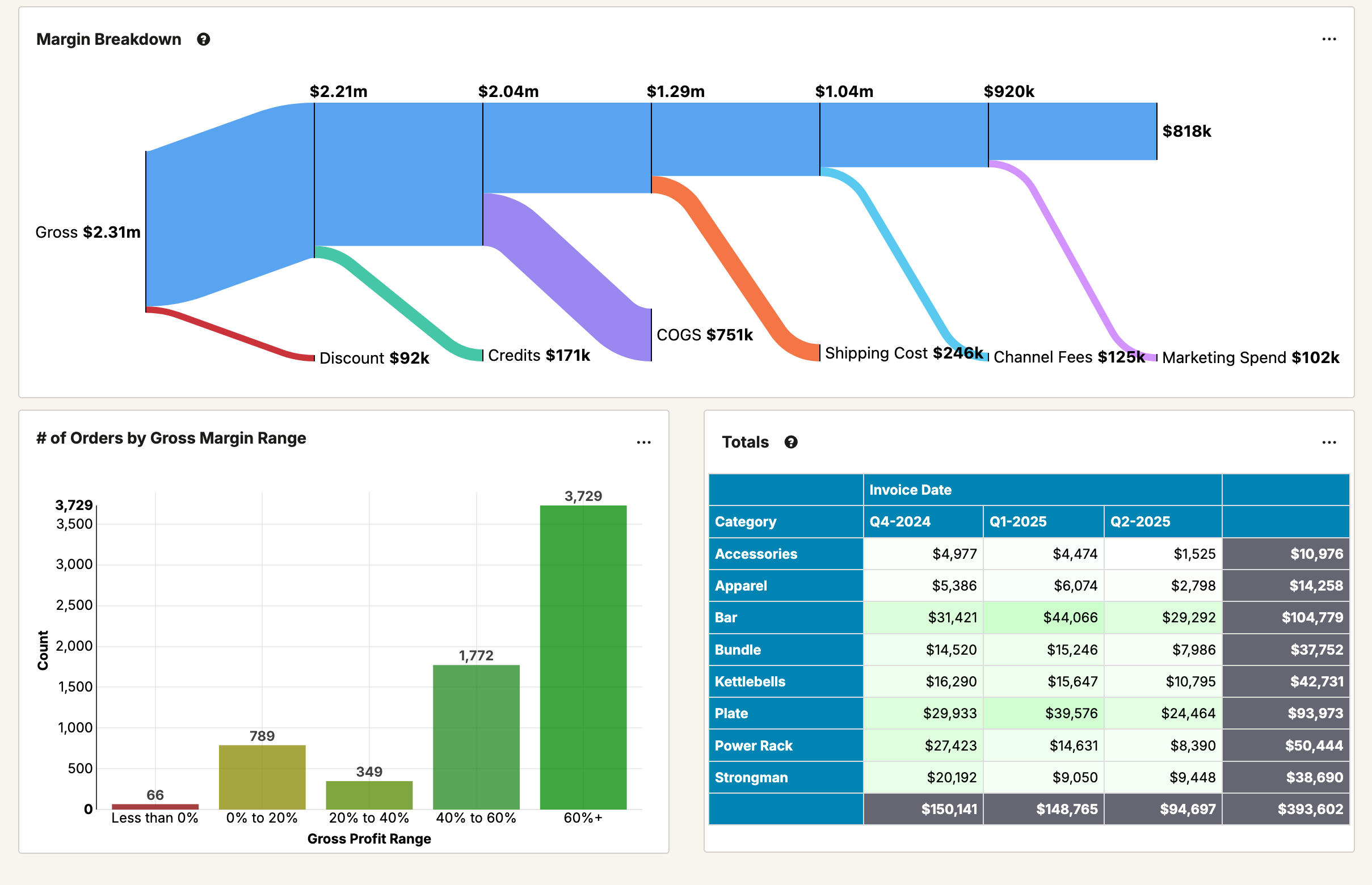
SOS Inventory Dashboard

Power up your SOS Inventory account with reports and dashboards based on your business data. Go from high level charts into actionable information in just a click.

Starting at $149 / month.


Report

Take advantage of prebuilt dashboards and easily create your own reports

Extend

Track customers and orders through CRM, e-commerce, fulfillment, shipping, and accounting

Take Action

Create inventory forecasts, commission reports, production plans, and more

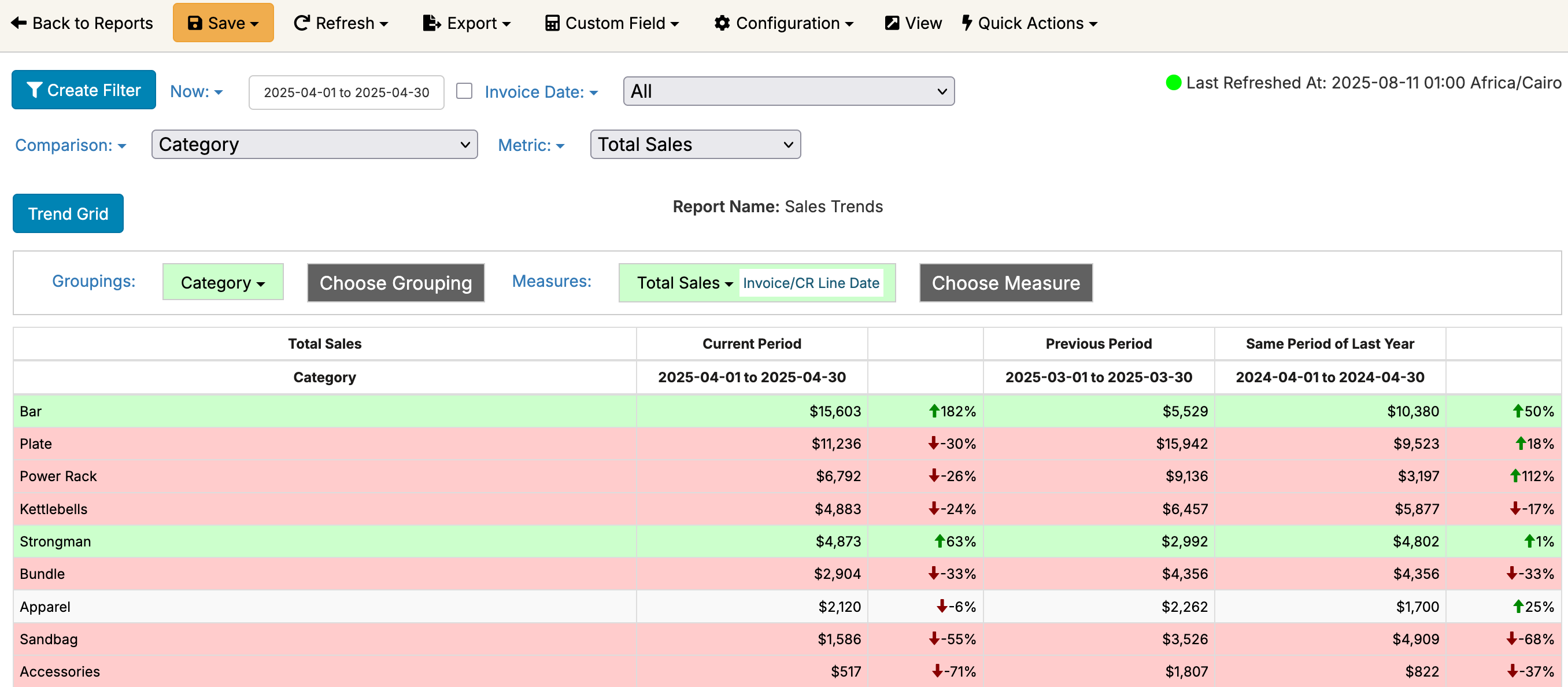
SOS Inventory Trends

SOS Inventory Reports Made Easy

Create beautiful interactive dashboards on your inventory data. Combine it with other systems such as CRMs, e-commerce, accounting, and other SaaS products to get a full view of the business.

Join Thousands of Satisfied Customers

“The endless filters, groupings, and measures Easy Insight offers has provided us the flexibility to view our project data unlike we have before.”

Easy Insight is a leader in Business Intelligence on G2
Users love Easy Insight on G2
Report Building

Create Custom Reports and Dashboards

Easy Insight's report builder automatically pulls over your SOS Inventory orders, customers, purchases, and more to create the custom reports you need in a few clicks. Get meaningful insights into your inventory data.

Best of Class Customer Support

We take tremendous pride in our team's ability to get you the results you need. Our customer success team will go the extra mile to make sure you're able to get the reports and dashboards you need.

Forecasting

Why Use Easy Insight With SOS Inventory?

Looking for more use cases for why you should use Easy Insight with SOS Inventory? Here are some of the various ways our customers have used Easy Insight:

Financial Reporting

  • Visualize sales totals, quantities, and margins by SKU, product category, sales rep, customer, or any other field, filtered by whatever fields you want and across any time period in your data.
  • Find your true profit on orders and SKUs. Allocate your shipping fees, channel marketplace fees, advertising spend, warehouse expenses, and more to figure out how much money you're actually making at the end of the day.
  • Analyze your COGS by splitting out costs between the base purchase cost, purchase freight, purchase duties, manufacturing costs, and any other landed costs.
  • Customize your COGS calculations--if for whatever reason you need to specify your own costs per product, you can. Use average cost to calculate estimated COGS for orders before they've been fulfilled.
  • Track trends in your sales across multiple years, analyzing the trends by category, brand, SKU, customer, or anything else. If you've loaded your historical data from before you started using SOS Inventory, your trend reports will automatically include that data as well.
  • Create custom reports on any fields in your SOS Inventory data. Reports will automatically combine data from sales, products, inventory, and other areas of SOS Inventory.

Data Validation

  • Make sure your SKUs and their prices match with your e-commerce integrations. You can create validation reports showing any price differences between sales channels and SOS Inventory.
  • Ensure your orders from e-commerce integrations are coming into SOS Inventory. You can connect Easy Insight to your SellerCentral, Shopify, BigCommerce, WooCommerce, Etsy, and other channels, then validate that no orders are being dropped.
  • Compare invoices to your accounting invoices in Xero and QuickBooks Online to make sure your financials are accurate.

B2B Reports

  • Set goals for your sales teams and sales sources and continuously track to ensure you're staying on target.
  • Combine CRM data like pipelines and contact activity with your SOS Inventory data.
  • Create commission statements for your reps, whether you just need a simple percentage of revenue or a complex formula.
  • Limit each rep to only see their own accounts when they log into Easy Insight and look at a dashboard.

Forecasting

  • Report on sales velocity to help calculate projected inventory demand.
  • Have a new implementation of SOS Inventory? Seamlessly pull in history from your previous system to inform forecasting.
  • Calculate reorder points and reorder quantities to drive replenishment.
  • Need to customize those reorder points or quantities yourself? Define specific ones per SKU or pull in the ones you've already configured in SOS Inventory.
  • Exclude orders and days
  • Look at lead time trends by supplier to identify which suppliers are falling behind on fulfilling your purchase orders.
  • Calculate inventory turnover to find overstocked items and reduce your warehouse costs.
  • Track seasonality with your forecasts to help accurately capture upcoming demand.

Full View of Your Business

Get the reports you need now!

Have questions? Contact us!
Call us at 720-316-8174 or contact us at sales@easy-insight.com.
Twitter Logo